Home / Dental Compliance / Dental LMS

Dental LMS

Dental LMS Software Built for Compliance and Recordkeeping

Smart Training’s LMS is built specifically for compliance tracking. With over 15 years of experience helping dental practices automate workflows, it gives your team a more efficient way to manage training, tasks, documentation, inspections, and incident tracking, all in one place.

Training and certificate tracking
Task management and reminders
Documentation and written programs
Incident and inspection tracking

Ready to See How It Works?

If you’re already looking for a dental LMS, you can explore the system or talk to our team to see how it would fit your practice. Get a clear overview with a free demo account that includes two short courses covering OSHA and HIPAA basics for dental practices. You’ll also receive simple “Where to Start” checklists for both OSHA and HIPAA to help prioritize next steps.

If you want to understand how the system works in more detail, the sections below walk through common challenges and how the LMS helps address them.

Where Dental Offices Run Into Compliance Tracking Issues

Compliance breakdowns usually do not come from a lack of effort. They show up in everyday moments where training, tasks, and documentation are managed across too many systems or not tracked consistently.

Smart Training brings training, tasks, documentation, and tracking into one system, giving your team a clearer and more consistent way to manage compliance.

By placing these features at your fingertips, the Smart Training LMS helps your team stay organized, keep everything up to date, and respond quickly when information is needed.

Create and Track Your Own Training Content

In addition to Smart Training courses, your office can upload and manage its own content. Add internal training materials, policies, or onboarding resources, then assign them to your team.

You can also track external training that is not part of the Smart Training library. Courses from state boards or other providers can be added by link, assigned to specific team members or locations, and tracked for completion. Reminders can be set for expiration or renewal requirements.

The LMS tracks who has completed the content, how they performed, and where follow-up may be needed. This makes it easier to standardize training across your office and keep everything documented in one place.

"Managing compliance across a large, multi-location organization requires training that’s consistent, current, and easy to deploy. Smart Training has helped us standardize compliance education without adding friction for our teams or a heavy lift for administrators.

Beyond compliance, we also value their ability to customize learning whether that’s tailoring content to our workflows, reinforcing expectations by role, or building training that actually fits how our teams operate.

They’ve also significantly reduced the burden on our internal team by handling inspections and helping ensure our locations stay audit-ready, which has saved time and removed a lot of stress from the process. The platform is user-friendly, the course library is strong, and the partnership has been responsive. We’ve been very happy with the experience."

Built Specifically for Dental Compliance

Most LMS platforms are built for general training, not compliance.

They do not typically support:

  • Tracking regulatory inspections and workplace incidents to resolution
  • Implementation of written programs and documentation
  • Recording recurring compliance tasks
  • Generating reports for audits, inspections, and internal review
  • Aligning compliance workflows across state and federal regulatory requirements

Smart Training’s LMS is designed around dental compliance, so everything works together instead of being managed separately.

How the System Supports Your Office

Smart Training’s LMS connects training, tasks, documentation, and tracking so your office can manage compliance without relying on multiple systems.

Workflows

Recurring Tasks, Reminders, and Accountability

Set up recurring tasks, assign responsibilities, and track completion across your team.

Reminders and deadlines help ensure important compliance activities are completed consistently without relying on manual follow-up.
Records

Documentation, Incidents, and Inspections

Store documents, track incidents, and complete inspections in the same system used for training and tasks.

This creates a complete record of what has been done, what has been updated, and what still needs attention.

Insights

Staff Check-Ins and Practice Trends

Use surveys and recurring insights to check in with staff and track trends over time.

This helps your practice better understand team feedback and identify areas that may need attention.

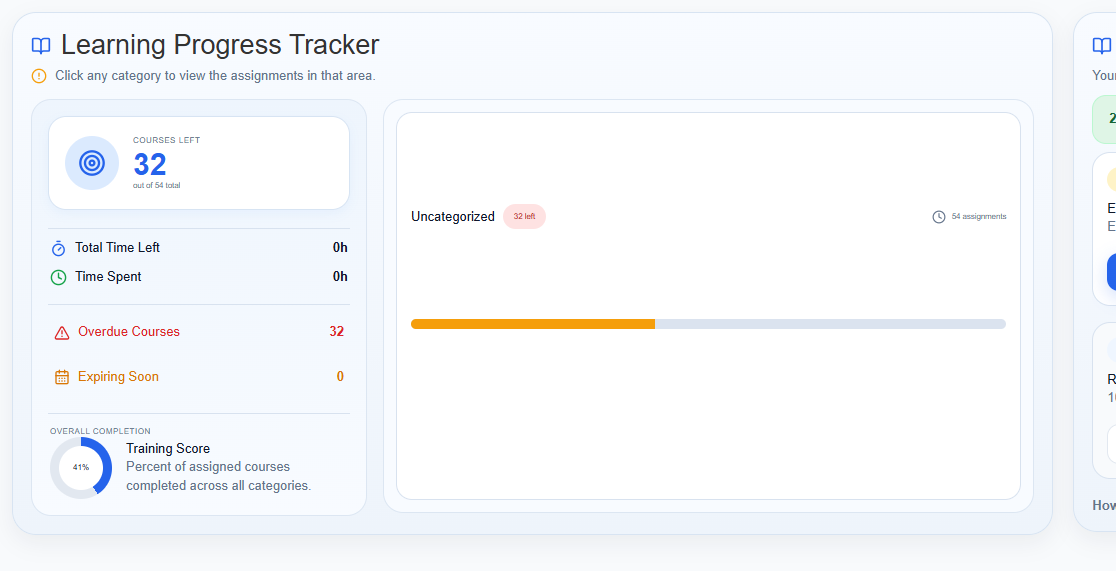
Smart Training learning progress tracker dashboard

Built for Practices of All Sizes

Smart Training’s LMS works for single-location practices and scales to support multi-location groups and DSOs spanning multiple states and hundreds of locations.

Whether you are onboarding a few team members or managing compliance across multiple locations, the system provides a consistent way to assign training, track completion, and manage documentation.

Our LMS gives your team a more streamlined way to manage compliance, without relying on separate systems, manual tracking, or inconsistent processes across locations.

Why Training Reminders Matter

Training reminders help dental offices stay ahead of missed deadlines, overdue refreshers, and last-minute compliance scrambling. Reminders can be customized and automated, with escalation options to help keep training on track across the team.

Dental LMS FAQs

Yes. The LMS allows you to generate and customize reports based on training, tasks, inspections, and documentation. This makes it easier to review progress, prepare for audits, and track compliance across your team.

An unhandled error has occurred. Reload 🗙

Rejoining the server...

Rejoin failed... trying again in seconds.

Failed to rejoin.
Please retry or reload the page.

The session has been paused by the server.

Failed to resume the session.
Please retry or reload the page.